

If you applied for admission into the University of Delta (UNIDEL), Agbor for the 2026/2027 academic session, there is good news. The university has started releasing the first batch admission list, and successful candidates can now check their admission status online.
Is the UNIDEL Admission List 2026/2027 Out?
Yes.
The University of Delta (UNIDEL), Agbor has begun releasing the 2026/2027 admission list. Candidates who participated in the admission process are advised to check both the UNIDEL admission portal and JAMB CAPS, as admissions may be uploaded in batches.
If your name has not appeared yet, don’t panic. Additional admission batches may still be released.
Requirements Before Checking Your Admission Status
Before checking your admission status, ensure you have:
- Your JAMB Registration Number
- Your JAMB profile login details
- Internet connection
- Smartphone or computer
How to Check UNIDEL Admission List on the School Portal
Follow these steps:
- Visit the UNIDEL admission portal.
- Log in with your application details.
- Open your admission dashboard.
- Click Admission Status.
- Check whether you have been offered admission.
- Print your admission notification if available.
How to Check UNIDEL Admission Status on JAMB CAPS
Sometimes admission appears on JAMB CAPS before or after the school portal.
To check:
- Visit the JAMB eFacility Portal.
- Log in.
- Click Check Admission Status.
- Select 2026 as your examination year.
- Click Access My CAPS.
- Open Admission Status.
- Check your admission offer.
If admitted, you’ll see Congratulations!
Related Guide: How to Check JAMB Admission Status on CAPS
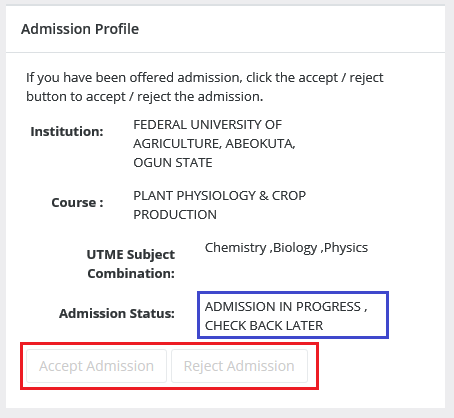
What Does “Admission in Progress” Mean?
If your status shows Admission in Progress, it means:
- Your admission is still under processing.
- The university has not completed uploading all admitted candidates.
- JAMB CAPS may not have updated your record yet.
You should continue checking regularly.
Related Guide: JAMB Admission Not Showing on CAPS? Causes and Solutions
What to Do After Seeing “Congratulations”
If you receive an admission offer:
- Accept your admission on JAMB CAPS.
- Print your JAMB Admission Letter.
- Print your JAMB Original Result Slip.
- Pay the UNIDEL acceptance fee when instructed.
- Complete your departmental and faculty clearance.
- Register your courses.
Do not delay, as the university may set deadlines for newly admitted students.
How to Accept Admission on JAMB CAPS
After confirming your admission:
- Log in to JAMB CAPS.
- Click Admission Status.
- Select Accept Admission.
- Confirm your choice.
- Wait for the confirmation message.
Your admission is now officially accepted.
Related Guide: How to Accept or Reject Admission on JAMB CAPS
How to Print Your JAMB Admission Letter
After accepting admission:
- Log in to your JAMB profile.
- Select Print Admission Letter.
- Pay the required service fee if applicable.
- Download and print your admission letter.
This document will be required during clearance and registration.
Related Guide: JAMB Admission Letter: How to Print Yours Online
How to Pay the UNIDEL Acceptance Fee
Successful candidates should:
- Visit the UNIDEL student portal.
- Generate an acceptance fee payment invoice.
- Make payment using the approved payment channels.
- Print the payment receipt.
- Complete the remaining registration and clearance procedures.
Always follow the official payment instructions published by UNIDEL, as fees and deadlines may change each admission cycle.
Frequently Asked Questions (FAQs)
Is the UNIDEL Admission List for 2026/2027 out?
Yes. The university has started releasing the first batch of the 2026/2027 admission list.
Where can I check my admission status?
You can check through the UNIDEL admission portal or JAMB CAPS.
My admission is not showing. What should I do?
Continue checking regularly. Admission lists are usually released in batches.
Can I gain admission without accepting it on JAMB CAPS?
No. You should accept your admission on JAMB CAPS to complete the admission process.
Can I print my admission letter before accepting admission?
No. You should first accept the admission offer before printing your JAMB Admission Letter.
What documents will I need after admission?
Generally, you’ll need:
- JAMB Admission Letter
- Original JAMB Result Slip
- O’Level result(s)
- Birth Certificate
- Local Government Identification
- Passport photographs
- Other documents requested by UNIDEL during clearance
Related Articles
- JAMB CAPS Admission Guide 2026
- How to Check JAMB Admission Status on CAPS
- How to Accept or Reject Admission on JAMB CAPS
- JAMB Admission Letter: How to Print Yours Online
- JAMB Portal Login 2026
- How to Upload O’Level Results to JAMB CAPS
- JAMB Admission Not Showing on CAPS? Causes and Solutions
- How to Print Original JAMB Result Slip 2026