

If you’re searching for how to upload your WAEC, NECO, or NABTEB result to the JAMB CAPS portal for the 2026/2027 admission session, you’ve come to the right place.
Uploading your O’Level result is an important step for candidates seeking admission into Nigerian universities, polytechnics, and colleges of education. If your result is not properly uploaded and reflected on the JAMB CAPS portal, your admission may be delayed or not processed.
In this guide, we’ll explain:
- How to check whether your O’Level result has been uploaded to JAMB CAPS
- How to upload your WAEC, NECO, or NABTEB result
- Common reasons uploads fail
- Important deadlines (once officially announced)
- Frequently asked questions
We’ll also show you how to confirm that your result is visible on your JAMB CAPS profile.
Requirements for Uploading Your O’Level Result
Before visiting a JAMB Professional Registration Centre (PRC) or accredited CBT centre, ensure you have:
- Your JAMB Registration Number
- Your WAEC, NECO, or NABTEB result
- Your examination number
- The examination year
- A valid phone number or email used during JAMB registration
How to Check If Your O’Level Result Has Been Uploaded to JAMB CAPS
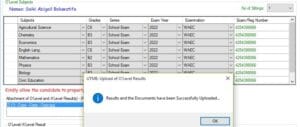
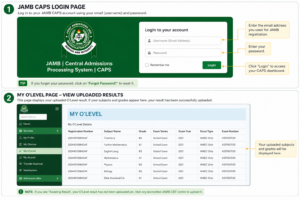
Follow these steps to verify your upload status:
- Visit the JAMB e-Facility portal.
- Log in with your registered email address and password.
- Click Check Admission Status.
- Select Access My CAPS.
- Open the My O’Level section.
If your grades are displayed correctly, your upload has been completed successfully.
If you see Awaiting Result or no subject grades are displayed, your O’Level result may not have been uploaded successfully. Visit an accredited JAMB Professional Registration Centre (PRC) or CBT centre for assistance.
How to Upload Your WAEC or NECO Result to JAMB CAPS
To upload your O’Level result:
- Visit an accredited JAMB Professional Registration Centre (PRC) or approved CBT centre.
- Inform the officer that you want to upload your O’Level result.
- Provide your JAMB Registration Number.
- Present your WAEC, NECO, or NABTEB result details.
- The officer will upload your result to the JAMB database.
- After the upload, log in to your JAMB CAPS account and confirm that your grades are displayed correctly.
Deadline for Uploading O’Level Results
Candidates are advised to upload their O’Level results as early as possible after completing their examinations and before their chosen institutions finalize admission processing.
Once JAMB officially announces a deadline for the 2026/2027 admission session, this article will be updated accordingly.
Frequently Asked Questions
Can I upload my O’Level result myself?
No. Uploading must be done at an accredited JAMB Professional Registration Centre (PRC) or approved CBT centre.
How much does it cost to upload an O’Level result?
The service fee varies by centre. Ask about the current charge before proceeding.
Can I upload two sittings?
Yes, if the institution accepts two sittings and your chosen course allows it.
How long does it take for the result to reflect?
In many cases, it appears shortly after upload, but processing times can vary.
Conclusion
Uploading your WAEC, NECO, or NABTEB result to the JAMB CAPS portal is an important step in the admission process. After uploading, remember to confirm that your grades appear correctly on your CAPS profile and monitor official announcements from JAMB for any updates regarding admissions or deadlines.