
Learn how to accept or reject admission on the JAMB CAPS portal for the 2026/2027 admission session. Follow our step-by-step guide, understand what each option means, and avoid common mistakes.
Receiving an admission offer is one of the most exciting moments for any candidate seeking admission into a Nigerian university, polytechnic, college of education, or other tertiary institution. However, your admission process is not complete until you respond to the offer through the Joint Admissions and Matriculation Board (JAMB) Central Admissions Processing System (CAPS).
Many candidates are unsure whether they should click Accept Admission or Reject Admission, and some worry about making a mistake that could affect their admission.
This guide explains everything you need to know, including what each option means, how to accept or reject admission on JAMB CAPS, common mistakes to avoid, and answers to frequently asked questions.
What Is JAMB CAPS?
The Joint Admissions and Matriculation Board (JAMB) Central Admissions Processing System (CAPS) is the official platform used to process admissions into Nigerian tertiary institutions.
Through CAPS, candidates can:
- Check their admission status
- Accept or reject admission offers
- Confirm uploaded O’Level results
- Monitor admission progress
- View transfer approvals (where applicable)
If your institution offers you admission, it will normally appear on your CAPS profile.
What Does “Accept Admission” Mean?
Accepting admission simply means you agree to accept the admission offered to you through JAMB CAPS.
Once you accept the offer, you can proceed with any next steps required by your institution, such as paying acceptance fees, completing clearance, or registering for courses when instructed.
Accepting admission on CAPS does not automatically complete your school registration. You must still follow your institution’s admission and registration procedures.
What Does “Reject Admission” Mean?
Rejecting admission means you are declining the admission offer displayed on your CAPS profile.
Candidates sometimes reject admission because:
- They no longer wish to attend that institution.
- They plan to pursue admission elsewhere.
- They believe the admission was offered for a course they do not want.
Before rejecting an admission offer, carefully consider the implications. If you’re unsure, contact the admissions office of your institution or JAMB for guidance.
Should You Accept or Reject Admission?
For most candidates who have been offered admission to their preferred institution and course, accepting the admission is the appropriate next step.
You should only consider rejecting an admission offer if you fully understand the consequences and have a clear reason for doing so.
Requirements Before Accepting Admission
Before logging into JAMB CAPS, make sure you have:
- Your JAMB eFacility login details (email address and password)
- A stable internet connection
- Your JAMB registration number
- A smartphone, tablet, or computer
How to Accept Admission on JAMB CAPS

Follow these steps to accept your admission offer:
Step 1: Visit the JAMB eFacility Portal
Open the official JAMB eFacility portal in your web browser.
(Insert Screenshot: JAMB eFacility Login Page)
Step 2: Log In
Enter your registered email address and password, then click Log In.
(Insert Screenshot: Login Screen)
Step 3: Open “Check Admission Status”
After logging in, scroll down and click Check Admission Status.
(Insert Screenshot: Dashboard Showing “Check Admission Status”)
Step 4: Select Your Examination Year
Choose the correct examination year from the available options.
Step 5: Click “Access My CAPS”
Select Access My CAPS to open your admission profile.
(Insert Screenshot: Access My CAPS Button)
Step 6: Review Your Admission Details
If you have been offered admission, your admission information will be displayed.
Take a moment to verify:
- Institution
- Course
- Admission status
Step 7: Click “Accept Admission”
If you are satisfied with the offer, click Accept Admission.
(Insert Screenshot: Accept Admission Button)
Step 8: Confirm Your Decision
A confirmation prompt may appear. Confirm your choice to complete the process.
Your CAPS profile should then reflect that you have accepted the admission.
How to Reject Admission on JAMB CAPS
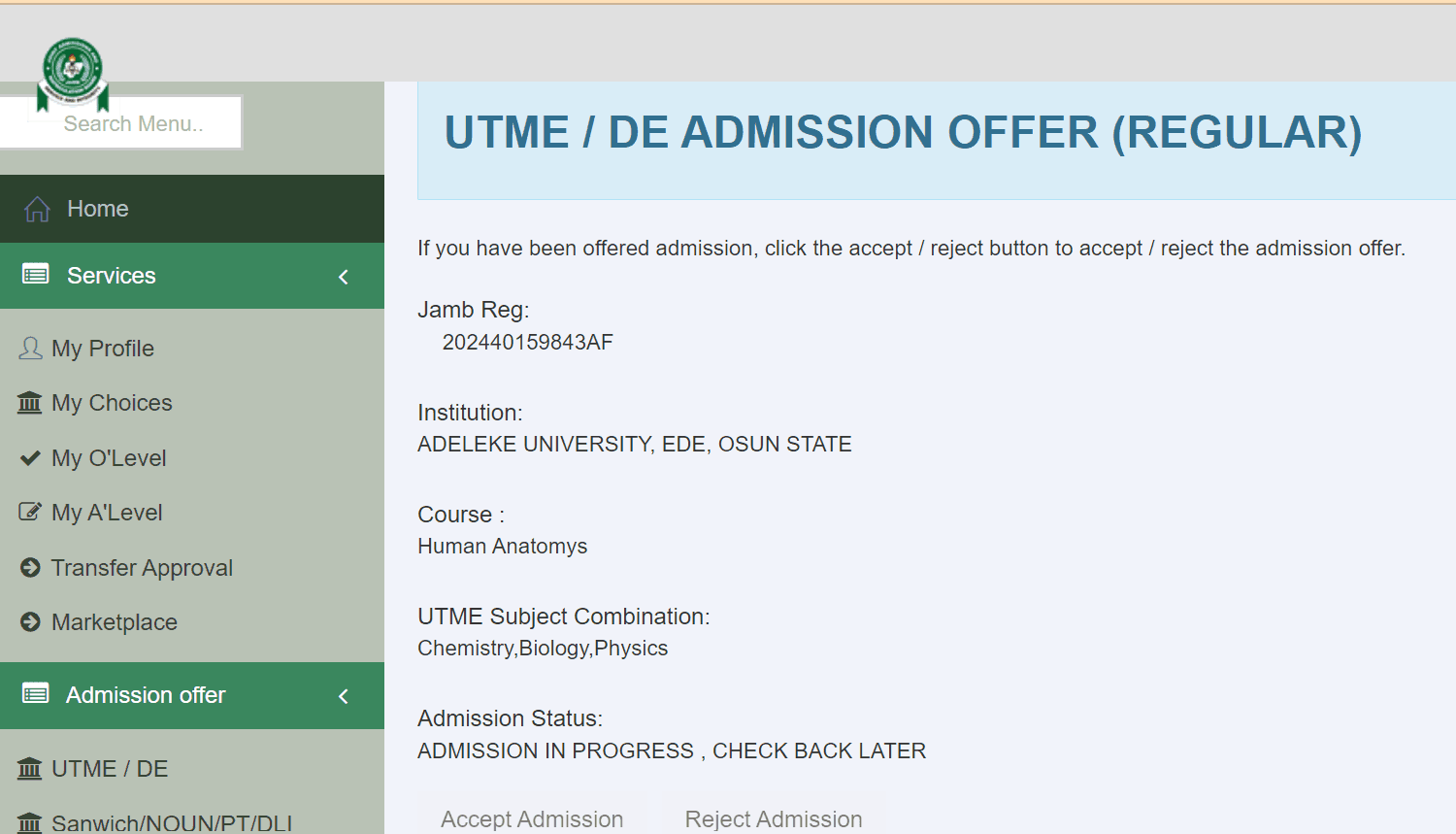
If you decide not to accept the admission:
- Log in to the JAMB eFacility portal.
- Open Check Admission Status.
- Click Access My CAPS.
- Review the admission offer.
- Select Reject Admission.
- Confirm your decision if prompted.
Only reject an admission offer if you have carefully considered your decision.
Can You Change Your Decision Later?
Many candidates ask whether they can reverse an acceptance or rejection on JAMB CAPS.
The process and available options can change depending on JAMB’s current policies. If you believe you accepted or rejected an admission in error, contact JAMB or your institution as soon as possible for guidance.
What to Do After Accepting Admission
Accepting admission on CAPS is only one part of the admission process.
You should also:
- Monitor your institution’s official admission portal.
- Complete any acceptance fee payment if required.
- Follow your institution’s clearance procedures.
- Upload any required documents.
- Print your JAMB Admission Letter when instructed.
- Stay informed about registration and resumption dates.
Common Problems and Solutions
I Can’t See the Accept Admission Button
This may happen if your institution has not yet processed your admission or your CAPS profile has not been updated. Continue checking periodically.
My Admission Status Shows “Admission in Progress”
This means your admission is still being processed. Wait for further updates from JAMB or your institution.
My O’Level Result Is Not Showing
If your O’Level result is missing from CAPS, your admission process may be delayed.
👉 Related Guide: How to Upload O’Level Results to JAMB CAPS (2026/2027 Guide)
I Forgot My JAMB Password
Use the password recovery option on the JAMB eFacility portal or follow the official account recovery instructions provided by JAMB.
Frequently Asked Questions
Can I accept admission on my phone?
Yes. You can access the JAMB eFacility portal using a mobile browser.
Is accepting admission the same as paying my acceptance fee?
No. Accepting admission on CAPS confirms your decision through JAMB, while acceptance fees (where applicable) are handled by your institution.
Can I reject admission and still be offered another course?
Admission processes vary by institution and JAMB policy. If you’re considering rejecting an offer, seek guidance from your institution before making a decision.
How long does it take for my acceptance to reflect?
In many cases, your status updates shortly after confirmation, although processing times may vary.
What happens if I don’t respond immediately?
Keep checking official JAMB and your institution’s announcements for any guidance on timelines. Respond promptly once you have made your decision.
Related Articles
To help you complete your admission process, you may also find these guides useful:
- How to Upload O’Level Results to JAMB CAPS (2026/2027 Guide)
- How to Check JAMB Admission Status on CAPS
- JAMB Registration Requirements 2027
- JAMB Cut-Off Marks Explained
Conclusion
Responding to your admission offer on JAMB CAPS is an important step in securing admission into your chosen institution. Before clicking Accept Admission or Reject Admission, review your admission details carefully and make sure you understand what each option means.
After accepting your admission, continue to monitor both your JAMB CAPS profile and your institution’s official portal for further instructions on clearance, registration, and other admission requirements.