
Getting that “Admission Offered” status on your JAMB CAPS portal is one of the best feelings after months of waiting. But before you start packing for campus, there’s one more official step you cannot skip: printing your JAMB admission letter. Many candidates assume the CAPS status alone is enough, only to be turned back during school registration because they don’t have this document in hand.
This guide covers exactly what you need, how to print it step by step, the payment process, common problems candidates run into, and how the admission letter differs from your result slip.
Requirements Before You Print Your Admission Letter
Before you attempt to print anything, make sure the following are in place:
- A confirmed “Admission Offered” status on JAMB CAPS. You cannot print an admission letter until an institution has formally offered you admission and it reflects on your CAPS profile.
- You must have accepted the admission on CAPS. JAMB will not release your admission letter until you’ve clicked “Accept Admission” on your CAPS dashboard. Simply seeing an offer isn’t enough — acceptance is a required action on your part.
- Your JAMB registration number. This is essential for retrieving your record on the portal.
- Login details for your JAMB e-Facility profile (the email address and password used during registration). If you’ve forgotten these, you’ll need to use the “Forgot Password” option to reset them before proceeding.
- A valid payment method. You’ll need a debit card, access to online/bank transfer, or USSD to pay the printing fee directly on the portal.
- A stable internet connection, and ideally an updated browser such as Chrome, Firefox, or Edge, to avoid interruptions mid-process.
- Access to a printer, or a plan to visit a cyber café or JAMB-accredited centre if you don’t have one at home.
If your admission has genuinely been processed but your course or institution still isn’t showing correctly, it may simply mean JAMB is still updating your CAPS record — this is common and usually resolves within a few days.
Step-by-Step Guide to Printing Your JAMB Admission Letter
Follow these steps carefully to avoid delays or errors:
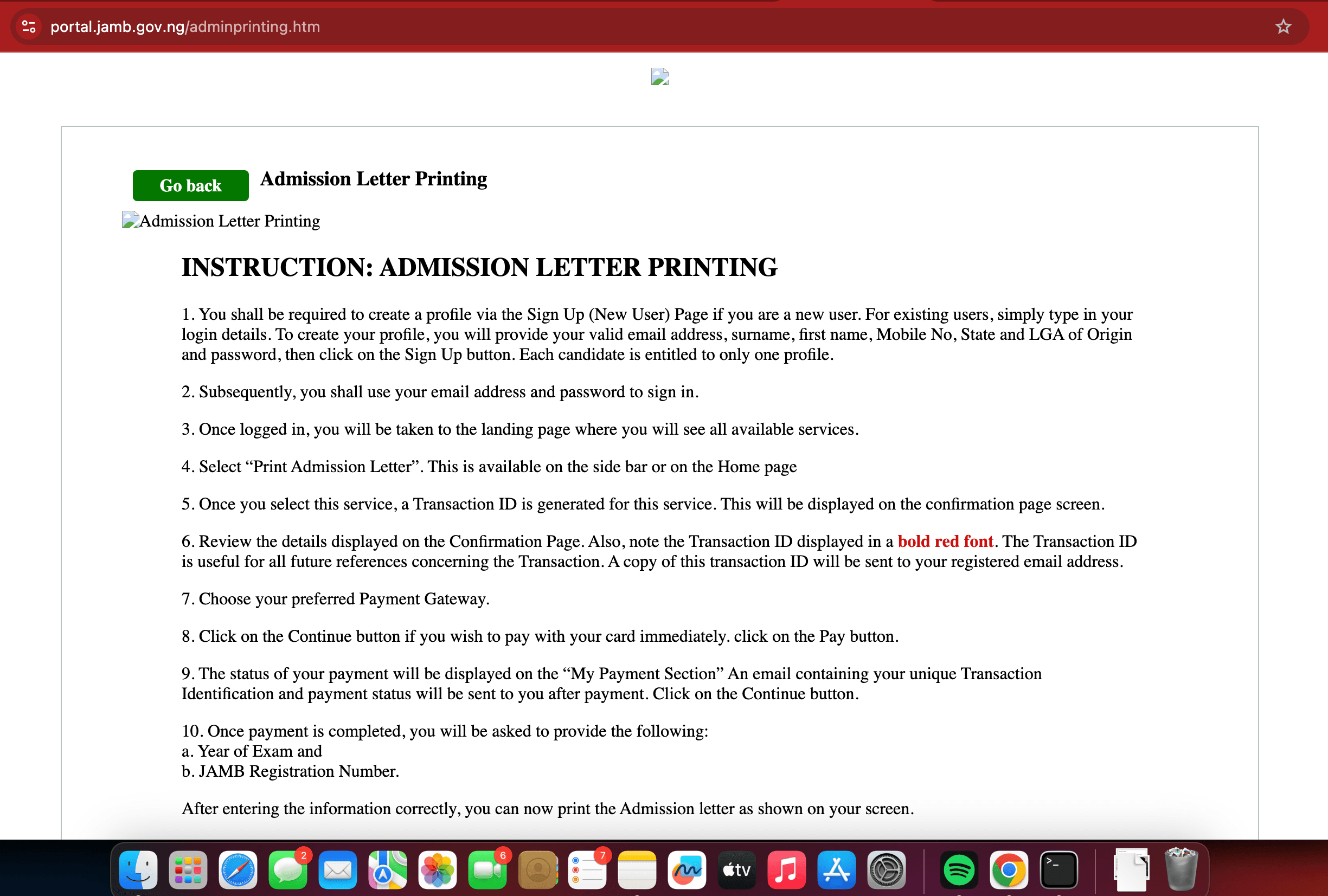
- Go to the official JAMB e-Facility portal at efacility.jamb.gov.ng.
- Log in using your registered email address and password.
- Locate the “Print Admission Letter” option on your dashboard or sidebar menu.
- Confirm your admission status first, if prompted. If you see “Admission Offered,” you’re clear to proceed. If you haven’t yet accepted the offer on CAPS, do that first through “Access My CAPS,” then return to this step.
- Click on “Print Admission Letter.” This takes you to the dedicated printing page.
- Proceed to make the required payment (covered in detail below). A Transaction ID will be generated for this service — note it down, as it’s useful for any future reference, and a copy will also be sent to your registered email.
- After payment is confirmed, select your examination year from the dropdown menu (for the current cycle, this would be the applicable admission year).
- Enter your JAMB registration number in the space provided, then click “Print Admission Letter” or “Submit.”
- Your admission letter will display on screen as a PDF document. Review every detail carefully — your name, institution, course, and admission year — before printing.
- Print the document in color if possible, ensuring it’s clear and legible. Many institutions specifically check that details are sharp and readable during physical verification.
- Save a digital copy as well. Keep the PDF stored safely on your device or email, in case you need to reprint later or submit it electronically.
If you don’t have a printer or run into technical issues, you can visit any JAMB-accredited centre with your registration number, and staff there will assist you in printing the letter on the spot, usually for a small additional service charge.
Payment Process for the Admission Letter
Accessing your admission letter requires a payment, made directly through the JAMB e-Facility portal. Here’s what to expect:
- The fee is a portal-based, non-refundable charge required each time you want to generate a fresh print, though once paid, most candidates can reprint the same letter multiple times without paying again — this detail can vary, so it’s worth confirming your specific portal message before assuming either way.
- Reported fees have varied across cycles and sources, with some guides citing figures around ₦1,000 and others noting higher charges depending on the service bundle. Because JAMB fees are subject to periodic review, always confirm the exact current amount directly on the portal at the point of payment rather than relying on a fixed figure from an external source.
- Accepted payment methods typically include debit/credit cards (Visa, Mastercard, Verve), direct bank transfer, USSD codes, and payment gateways like Remita.
- After selecting your preferred payment method, you’ll be directed to complete the transaction. A confirmation page will display your Transaction ID in bold, along with the status of your payment.
- You’ll receive an email containing your Transaction ID and payment confirmation once the process is successful — keep this for your records.
- If payment fails or doesn’t reflect immediately, avoid making repeated payments in quick succession. Wait a few minutes and check your “My Payment” section on the portal before trying again, as duplicate payments for the same service are not always automatically refunded.
Common Problems Candidates Face (And How to Fix Them)
1. “Print Admission Letter” Option Not Showing
This usually means your admission hasn’t been fully processed yet, or you haven’t accepted the offer on CAPS. Double-check your CAPS status first, and if everything looks correct but the option still isn’t visible, give it a few days — JAMB’s system updates in batches, not instantly.
2. Admission Letter Shows Wrong Course or Institution
If you recently changed your course or institution and your letter still reflects the old details, it likely means the acceptance of that change hasn’t been finalized on CAPS. You must formally accept the updated course or institution transfer on CAPS before the admission letter will reflect it correctly.
3. Payment Made But Letter Still Not Accessible
This can happen due to network issues or delays in payment confirmation. Check your “My Payment” section on the portal to confirm the transaction actually went through. If the payment is confirmed but the letter still isn’t generating, contact JAMB support with your Transaction ID rather than attempting a second payment.
4. Errors in Personal Details on the Letter
If you spot incorrect personal information — a misspelled name, wrong date of birth, or similar — do not attempt to self-correct it. Visit a JAMB office or an accredited centre to formally request a correction, since these details typically need to be fixed at the source before a new letter can be generated.
5. CAPS Still Shows “Processing” With No Clear Update
If your admission status has been stuck on a processing or pending message for an extended period, keep checking regularly rather than assuming the worst. In many cases, this reflects JAMB or the institution still finalizing batches of admissions, not a rejection. Ensure your O’Level results have been properly uploaded to your CAPS profile, as missing O’Level data is a frequent, quiet cause of admission delays.
6. Difficulty Printing Due to No Access to a Printer
If you can access the letter on your phone but have no way to print it, visit any JAMB-accredited centre or a cyber café near you. Provide your registration number, and staff will assist with printing for a small token fee.
7. Confusion Between the Candidate’s Copy and the Institution’s Copy
Some institutions require both a candidate’s copy and an institution’s copy of the admission letter. Make sure you print and retain both if your school specifically asks for them, rather than assuming a single printout covers every requirement during registration.
Admission Letter vs. Result Slip: What’s the Difference?
Candidates frequently confuse these two documents, but they serve entirely different purposes.
| JAMB Result Slip | JAMB Admission Letter | |
|---|---|---|
| What it confirms | Your UTME score and performance in the examination | Your formal, accepted admission into a specific institution and course |
| When it’s issued | Shortly after UTME results are released | Only after an institution offers admission and you accept it on CAPS |
| Purpose | Used for Post-UTME screening, checking eligibility, and course/institution change decisions | Required for school registration, clearance, and later verification (e.g., NYSC) |
| Does it guarantee admission? | No — it only shows your score, not an admission outcome | Yes — it is direct proof that admission has been formally granted and accepted |
| When you can access it | Immediately after result release, provided you’re registered for that cycle | Only after your admission status shows “Admission Offered” and you’ve accepted it on CAPS |
In short: your result slip tells you and institutions how you performed, while your admission letter tells everyone that a specific institution has actually admitted you into a specific course. You cannot skip straight to printing an admission letter without first going through result release, Post-UTME screening (where applicable), and a formal admission offer that you’ve accepted on CAPS. Both documents matter, but only the admission letter is accepted as final proof of your placement.
Final Thoughts
Printing your JAMB admission letter is usually a quick, straightforward process — but only once you’ve confirmed you meet every prerequisite: an accepted admission on CAPS, correct personal and course details, and a successful payment. Take the extra few minutes to review your printed letter carefully before submitting it anywhere, since errors are far easier to fix before school registration than after. If you run into a snag along the way, JAMB’s accredited centres remain your most reliable backup, and checking your CAPS status regularly will save you a lot of unnecessary worry during this final stretch of the admission process.